Accent EXCEL Password Recovery for Excel 6-2021
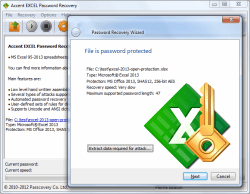 |
Accent EXCEL Password Recovery is the fast and easy way to restore lost passwords to files created in any version of Microsoft Excel. The program’s unique optimization for Intel and AMD processors guarantees top-speed password recovery. And there’s nothing to learn: the simple, functional AccentEPR interface does it all for you. |
|
Accent EXCEL Password Recovery Benefits
- Supports all versions of Microsoft Excel (from Excel 6/95 to Excel 2021)
- Instantly removes several types of passwords
- Automatically recovers passwords using pre-installed scenarios
- Includes macrolanguage for adding password mutation rules to dictionary attacks
- Reduces password recovery time on all computers with Intel and AMD processors
Increase the searching speed dozens of times with
Password recovery for Excel 95-2021 (.xls/.xlsx)
Here’s a video tutorial on everything you can do with AccentEPR and how easy it is:
Supported Formats and Password Types
| Microsoft Excel | |||
|---|---|---|---|
| Versions: | 6.0 | 97-2003 | 2007-2021 |
| Password to open: | •* | C | C |
| Password to modify: | •* | •* | •** |
| VBA Password: | •* | •* | •** |
| •*- instant recovery •**- instant removes C - CPU recovery • - not supported | |||
Advantage: full version support and fast password deletion
Automated password recovery
The software evaluates your computer’s configuration and performance in order to select a recovery scenario that balances recovery time and the number of passwords covered.
Advantage: quick start
Password mutation rules
AccentEPR comes with a built-in macrolanguage that lets you create password mutation rules for dictionary attacks. With this flexible feature, you can change the spelling of a password, add words and symbols, combine passwords from multiple dictionaries, and more! This approach cracks passwords like "pa55word" or "VeryStrongPassword1234" much faster than other options.
Advantage: flexible management of dictionary attacks
High-speed recovery
The highly optimized code in Accent EXCEL Password Recovery draws on the unique features and strengths specific to each Intel or AMD processor in order to fully leverage their potential and achieve top password recovery speeds. Put simply, program saves you significant time when recovering passwords.
Advantage: time savings
When you encounter the problem of a lost Microsoft Excel password, let AccentEPR fix it. You can be sure you’re using the best solution available.
Download demo version of Accent EXCEL Password Recovery
Licensing
The demo version of Accent EXCEL Password Recovery comes with a number of restrictions:
- displays only two first symbols in the password
- attacks cannot be run longer than for 30 minutes
- not saves a Password Recovery Status file
To gain unrestricted access to all of the features of the program, choose a license based on your needs and usage:
| Home License | Business License | |
|---|---|---|
| Microsoft Excel 95 | CPU | CPU |
| Microsoft Excel 97-2003 | CPU | CPU |
| Microsoft Excel 2007-2021 | CPU | CPU |
| Unrestricted | ✔ | ✔ |
| 1 year of free updates | ✔ | ✔ |
| Free technical support | ✔ | ✔ |
| Personal home use (1 PC) | ✔ | ✘ |
| Corporate use (1 PC) | ✘ | ✔ |
With an Accent EXCEL Password Recovery license you get:
- Unrestricted access to all features
- Free updates for one year
- Free technical support
Payment is available via various online and offline methods. The full list of options depends on the region and is available on the order page. All transactions related to license purchases for software are secure and strictly confidential.

 The program is a perfect solution to the problem of a lost
Excel password. Yet we recommend using software that easily handles Microsoft Office 95 – 2021 and OpenOffice documents and also features
GPU computing with NVIDIA, AMD and Intel Arc graphic cards.
The program is a perfect solution to the problem of a lost
Excel password. Yet we recommend using software that easily handles Microsoft Office 95 – 2021 and OpenOffice documents and also features
GPU computing with NVIDIA, AMD and Intel Arc graphic cards.
Features
Full features list of Accent EXCEL Password Recovery, 25.01  :
:
- compatibility with Microsoft Excel 95 - Excel 2021
- the program supports different password types:
- password to open a document (with three attack types for successful recovery)
- passwords to open sheets (instantly cracked)
- password to modify (instant password recovery)
- Excel VBA password protecting a VBA project (instant VBA password recovery)
- three attack types: Brute force attack, mask and dictionary-based attacks;
- easy-to-use and user-friendly graphical interface
- operation under Windows 11/10 and earlier Windows editions up to Windows XP
- stable SecurityApplication with $40 USD for Home License
User Ratings
Kenneth Klinzing from the United States: “Great product. Saved me 5 hours from rebuilding the spreadsheet. Easy to use. Highly recommend.”
Jozef Zoldos from the United States: “Thanks so much. I reviewed some of the guides and was able to do a "user defined" password search. The software was able to generate a password that worked!!!! Thanks so much. I tried other products prior to using Passcovery but they were significantly slower.”
an Anonymous Customer from the Canada: “This is a very good software. I can recover my password in about 2 hours.”
Mike Chalbyshev from the Russia: “It's a good product. It all depends on how powerful your rig is. Mine has a Xeon, and it was giving me 2.7 million selections per second. I could open WHATEVER I wanted.”
an Anonymous Customer from the India: “Password recovery tool working nice and it is very useful. Thanks & Regards”
David Stojakovich (Hoeganaes Corporation) from the United States: “Accent Password Recovery for Excel truly works. I made an xlsm file as part of a work flow in SharePoint in July and for some reason I did not use my routine password. Now in October I went back to modify the file and realize I had totally forgotten what password I created. Thanks Passcovery your program saved my day!”
Julia Afanasyev from the Russia:“Thank you, the program helped me.”
Narcis Castillo from the USA:“Excellent performance!”
Yusuf Peoples from the USA: “Accent Password recovery is awesome! My position was eliminated due to budget cuts, and I was laid off last week. I recently was asked to submit a copy of my resume asap, and I could not remember the password to access my resumes. With the use of this software I was able to recover my password protected document within seconds! I am 100 % satisfied with this product and recommend it.”
Aaron Cash from the USA: “This program took less than 20 seconds to recover the sheet password. Thank you. You saved me many hours.”
Randell Canady: “The new version of AccentEPR ran just fine on Windows 7. It was a long process, but it did recover the password that was set to open the file. I would recommend this software for anyone that needs an excel file password recovered. But a warning of the time should be made up front.”
Edward Torres from the USA: “Thank you for helping me with my password issue with my 2010 Excel. It saved me many HOURS of recreating my work.”
Pieter Swart from the Zuid-Afrika: “The best Excel password recovery software I evaluated. Super fast compared to other programs available and easy to use.”
Martin Nappert from the France: “Great job guys, this worked and I recovered the lost password on my xlsx document. Case closed.”
Rune Stenvall from the Sweden: “Excellent, reliable and fast. I can recommend this Product to everyone.”
Total Scores: 5 stars with 15 reviews
Technical Support
Have a suggestion, question or request about any of our software? Contact our Service Team for a rapid response.
* Service Team response times vary depending on request volume, the complexity of a given request and the time of day the request was received. We usually respond within 24 hours Monday through Friday, excluding weekends and holidays.
Remove passwords for Excel 97-2003
Delete passwords to open Microsoft Excel files with AccessBack.com.
AccessBack.com is an online service offering guaranteed removal of passwords from any files created in Microsoft Excel 97-2003 (files ending in .xls/.xla with 40-bit encryption).
The service uses rainbow table technology to run through encryption keys at light speed, decrypt the document and remove the password.
Results are guaranteed, regardless of how long or complex the original password.
Delete Excel password with AccessBack.com
* While processing time depends on demand, we promise results in less than 24 hours from the time you upload your file.
Quick Info
Latest version: 25.01 January 30, 2025
- Overall performance improvements: The core of the program has been updated, resulting in faster lost password recovery.
Size: 8060 Kb
:  Windows 11/10 and earlier versions of Windows
Screenshots
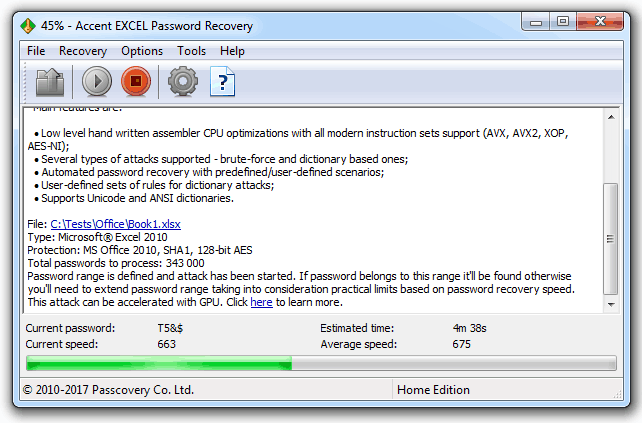
Main window
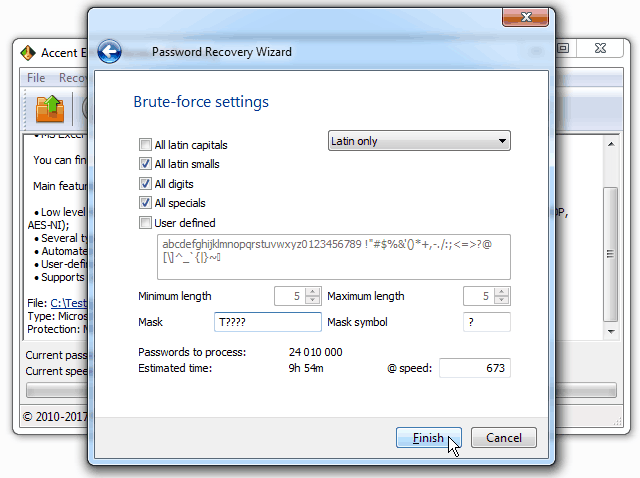
Choosing a Password attack in AccentWPR
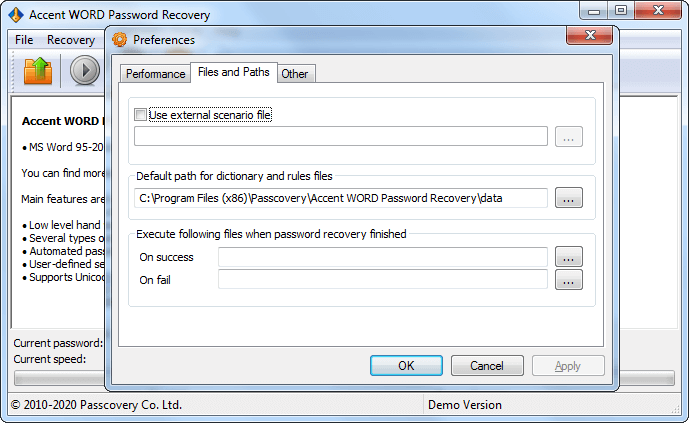
Program Settings
Official AccentEPR Icon


Main window Task Setup
Knowledge base
How to Decrypt an Excel File Online When the Password is Lost
Why We Don't Decrypt Excel/Word 2007-2021 Files
Is There a GPU I Could Use to Crack a Random 8-character WinZip Password In Just One Hour?
Follow us
Partners