

Accent PDF Password Recovery – Fast Adobe PDF Password Recovery
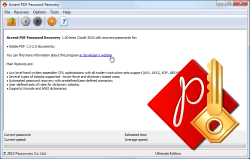
Accent PDF Password Recovery recovers lost passwords for any Adobe PDF document. It is optimized for maximum performance on modern Intel/AMD CPUs and offers flexible control over the password search process.
Why we are trusted
- 1,000,000+ installations worldwide
- 25+ years on the market since 1999
- 100% works on your PC
-
 guaranteed virus-free
Two Types of PDF Protection: What Can Be Removed Instantly?
There are two fundamentally different forms of PDF protection. Understanding the difference can save you hours and help you choose the right tool.
Permissions Password – Remove editing/usage restrictions INSTANT
✅ Removed in 1–2 seconds without brute-force!
If a PDF opens without a password but you cannot:
- Print the document
- Copy text
- Edit content
- Extract pages or images
…then it has a Permissions Password (also known as the “Owner” password). Accent PDF Password Recovery instantly removes this protection, regardless of the password's complexity.
Document Open Password – REQUIRES BRUTE-FORCE
If the PDF won't open without a password, it's the Document Open Password (also known as the “User” password). This type requires testing possible passwords using a brute-force method.
| Encryption Type | PDF Version | Recovery Techniques | Recovery Feasibility |
|---|---|---|---|
| RC4 40-bit | PDF 1.2 (legacy) | Key extraction and decryption without password; brute-force if needed | Guaranteed (outdated encryption) |
| RC4 128-bit | PDF 1.3–1.6 | Brute-force; GPU acceleration available | Moderate (effective when the password is simple) |
| AES 256-bit | PDF 1.7 EL3 | Brute-force; increased speed due to a known implementation issue | Above average (password hints recommended) |
| AES 256-bit | PDF 1.7 EL3/EL5/EL7 and PDF 2.0 | Brute-force with mask attack and dictionary mutation | Low without hints (password structure knowledge is important) |
💡 How to determine what type of PDF protection you have
Try opening the document normally:
- The file opens, but actions are restricted → Owner password → Removed instantly
- The file asks for a password before opening → User password → Requires password recovery (brute-force / masks / dictionaries)
How to Recover a PDF Password
See what Accent PDF Password Recovery can do for you and how easy it is to get it done:
Why Not Online Services? Risks for PDFs
Online services can be convenient in some cases, but they pose serious risks for sensitive documents, such as contracts, financial reports, medical records, and NDAs.
Comparison: Online Services vs Accent PDF Password Recovery
| Criterion | Accent PDF Password Recovery | Online Services (iLovePDF, SmallPDF, Sejda) |
|---|---|---|
| Data Security | ✅ Everything runs locally on your PC ✅ Document never leaves your computer |
❌ Document is uploaded to a third-party server ⚠️ Risk of sensitive data exposure |
| What Can Be Removed | ✅ Owner password (permissions) instantly ✅ User password (document opening) |
✅ Only Owner password (restrictions) ❌ User password not recoverable |
| Limitations | ✅ No file size limits ✅ Unlimited usage |
❌ File size: 5–50 MB ❌ Daily operation limits |
| Speed for User Password | ✅ Depends on PDF version and PC performance | ❌ Not supported |
| Cost | From 40₽ for the first year | $6–15/month subscription or $10–20 per operation |
| Internet | ✅ Not required (works offline) | ❌ Always required |
⚠️ Note: Uploading sensitive documents to an online service puts you at risk of losing control over your data. Even if the service promises to delete the files, they still pass through the service's servers and may end up in logs, backups, or databases.
Recommendation: Only use online services for public documents without confidential information. Always use local desktop solutions for business documents, contracts, and financial reports.
Need to remove PDF protection right now?
Permissions Password (restrictions): The demo version will remove this protection instantly and for free (from part of the file) – try it now!
Document Open Password (forgotten password): The demo shows the actual brute‑force speed on your PC for your locked file.
Download Accent PDF Password Recovery for Free
Windows 11/10/8/7 • Works locally • No file uploads • Multi-language interface
Licensing
The demo version of Accent PDF Password Recovery comes with a number of restrictions:
- displays only two first symbols in the password
- attacks cannot be run longer than for 30 minutes
- not saves a Password Recovery Status file
To gain unrestricted access to all of the features of the program, choose a license based on your needs and usage:
| Home License | Business License | |
|---|---|---|
| Adobe PDF 1.1 - 1.3 (Acrobat 2-4) | CPU | CPU |
| Adobe PDF 1.4 - 1.6 (Acrobat 5-7) | CPU | CPU |
| Adobe PDF 1.7 EL3, EL5, EL8 (Acrobat 9-DC) | CPU | CPU |
| Unrestricted | ✔ | ✔ |
| 1 year of free updates | ✔ | ✔ |
| Free technical support | ✔ | ✔ |
| Personal home use (1 PC) | ✔ | ✘ |
| Corporate use (1 PC) | ✘ | ✔ |
| Buy for 40 $ | Buy for 60 $ |
With an Accent PDF Password Recovery license you get:
- Unrestricted access to all features
- Free updates for one year
- Free technical support
Payment is available via various online and offline methods. The full list of options depends on the region and is available on the order page. All transactions related to license purchases for software are secure and strictly confidential.

Accent PDF Password Recovery Performance Across PDF Types
Performance measurements (passwords checked per second) on selected CPU models:
Brute-force speed boost in Passcovery's flagship product – Passcovery Suite with GPU acceleration for PDF documents compatible with Acrobat 6 / Acrobat 7 protection:
Measurements are based on Passcovery Suite benchmarks. The GPUs shown in the chart are the best in terms of passwords per dollar, according to Passcovery's GPU ranking for password recovery.
AccentPPR features
All of the features you can find in Accent PDF Password Recovery, 25.04  :
:
- Support for all Adobe PDF versions
- Support for diverse password types:
- Finds the Open password (“user password”) for PDFs
- Finds the Permission password (“master password”) for PDFs
- Decrypts documents with 40-bit encryption (Adobe Acrobat 2–4)
- Three attack types: brute force, attack by mask, attack by dictionary
- Automatic password recovery mode operates based on preset scripts
- Advanced masking can generate passwords during brute force attacks
- Built-in macro language for creating password mutation rules to be applied during dictionary attacks
- Built-in Rule Editor for easy visual editing of mutation rules
- Convenient, easy-to-learn interface
- Both GUI and command-line interfaces (CLI) included
- Great SecurityApplication with $40 USD for Home License
- Compatible with Windows 11 and earlier versions, all the way back to Windows XP
Supported Formats and Password Types
| Adobe PDF | |||
|---|---|---|---|
| Versions: | Acrobat 2-4 (RC4 40-bit) | Acrobat 5-8 (RC4 128-bit, AES-128) | Acrobat 9-DC (AES-256) |
| Document open password: | C | C | C |
| Encryption key searching: | C | • | • |
| Permissions password: | •* | •* | •* |
| •*- instant recovery C - CPU recovery • - not supported | |||
Diverse attacks
Accent PDF Password Recovery offers three methods for password recovery: brute force, attack by mask, and attack by dictionary. Each attack has plusses and minuses. Depending on the situation these types of attacks will have different success rates.
How to choose a password recovery method
Selecting the right method can significantly speed up recovery:
- Use a dictionary attack if the password is based on words, names, dates, or their combinations. The program can check millions of options in minutes.
- Choose a mask attack when you remember the password structure: length, positions of known characters, types of characters used (letters only, letters with numbers, etc.).
- Brute-force attack – the last resort for short passwords when other methods fail. Start with the minimum length and increase gradually.
Pro tip: Start with faster methods (dictionary, mask with known parts) before moving to a full brute-force search.
PDF decryption
AccentPPR rescues your data that has been encrypted in PDFs in Adobe Acrobat 2–4 format (40-bit encryption). The program simply decrypts the password-protected file and creates an exact copy that does not have the password. The time needed to find the decryption key is always the same – it does not depend on the length or complexity of the original password.
Automatic password search
A special feature for beginners. The program evaluates the computer’s configuration and performance to automatically select the script that best balances search time and the number of passwords to try.
Advanced masking for brute force attacks
A special feature for professionals. The advanced mask support built into the program adds new features for creating sophisticated masks that can verify passwords and save time by omitting unneeded potential password candidates.
Macro language
A special feature for professionals. The built-in macro language describes the rules for mutating the passwords tried in dictionary-based attacks. This changes the shape and appearance of passwords, adding words and characters, combining passwords from several dictionaries, etc. Unusual passwords such as "pa55word" and "VeryStrongPassword1234" are found much more quickly.
Real-Life Scenarios: When You Need Accent PDF Password Recovery
Case 1: Urgent Printing of a Protected Contract
Problem: A partner sent a PDF contract with printing restrictions. Signing is in 2 hours – you need a paper copy.
Solution: The Permissions Password (master password) is removed in 2 seconds → the document can be printed.
Time to solve: 1–2 seconds
Case 2: Copying Text from a Protected PDF
Problem: A research paper or manual with copy restrictions. You need to quote or extract data.
Solution: Accent PDF Password Recovery instantly removes restrictions → text becomes available for copying.
Time to solve: 1–2 seconds
Case 3: Forgotten password for personal archive
Problem: Five years ago, a PDF archive of family documents was protected with a password. The password is forgotten; I only remember it started with "Family".
Solution: Mask attack Family???? with character sets chosen for the "tail". If the word was followed by 4 digits, the password can be found in minutes.
Time to solution: From minutes to days (depends on complexity and quality of hints (positional mask, dictionary mutation))
Case 4: Editing a received PDF
Problem: Received a form or template with editing restrictions. It needs to be adapted for personal use or updated for 2025 requirements.
Solution: Remove the Permissions Password → the document can be edited in Adobe Acrobat or Foxit.
Time to solution: 1-2 seconds
Passcovery Suite
Looking for more? You need Passcovery Suite — a multi-format premium GPU password recovery tool.
Passcovery Suite supports:
- Microsoft Office documents
- OpenOffice/LibreOffice documents
- Adobe PDF documents
- Zip and RAR archives
- Apple iOS and Blackberry OS backups
- encrypted TrueCrypt volumes
- WPA/WPA2 handshakes
The software works on NVIDIA/AMD/Intel Arc video cards and guarantees the highest possible password recovery speed on any computer.
Get more about Passcovery Suite
NB: Passcovery Suite uses a PDF password recovery module and an interface that are identical to those used in AccentPPR.
Frequently Asked Questions
Is it legal to use PDF password recovery software?
Yes, as long as you are recovering access to your own documents or have the legal right to access the file.
Using the software to access someone else's documents without permission is illegal.
Accent PDF Password Recovery is intended for legally recovering access to your own files.
Is my data safe when I use the software?
Absolutely safe. Accent PDF Password Recovery works entirely on your computer – no data is sent over the internet.
Your document remains confidential and never leaves your PC.
The program contains no spyware and does not collect any user information.
Does the software support the newer PDF versions (ISO 32000‑2 / PDF 2.0, Revision 6)?
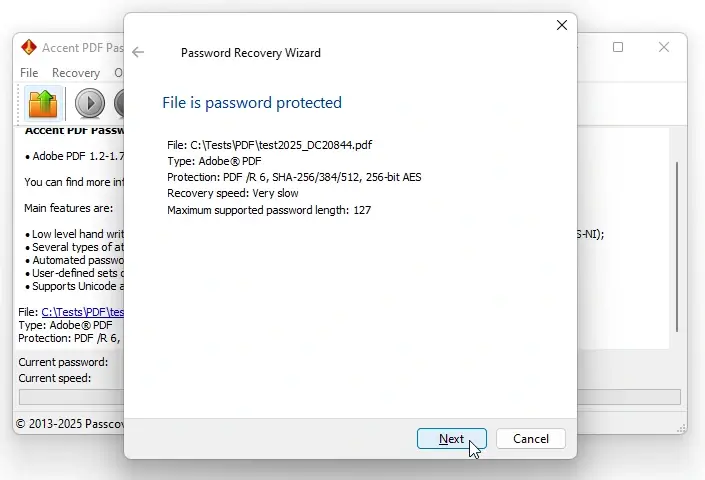
Yes. Accent PDF Password Recovery supports all Adobe PDF versions – from Acrobat 2 (PDF 1.2, /R 2) up to the latest Acrobat DC revisions (PDF 2.0, /R 6).
The program automatically detects the document’s PDF version and encryption type.
As soon as you select the file, you’ll see the format version and protection details before choosing an attack method.
What if I only remember part of the password?
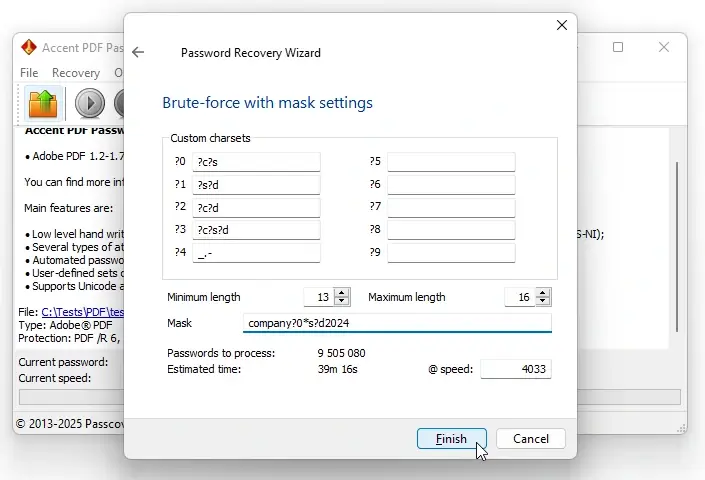
Use the program's powerful positional mask attack feature.
Specify known and guessed characters for each position, and the program will test only the unknown positions under the given constraints.
For instance, if you recall that the password begins with "company" and ends with "2024," the search time could be reduced by thousands or even millions of times.
Can a very complex password be recovered?
In theory, yes. In practice, it depends on several factors, such as the PDF version, the complexity of the password, and whether you have any hints.
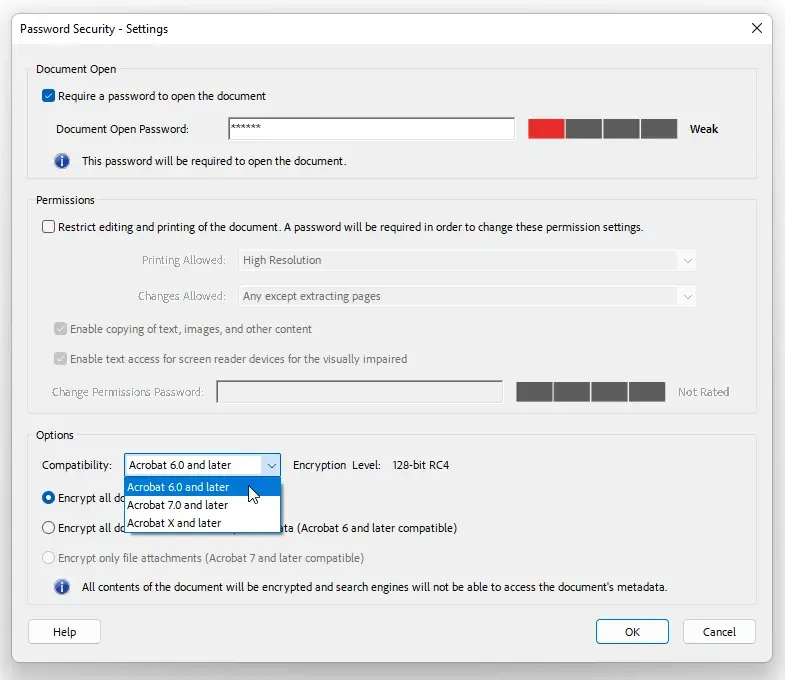
For example, a six-character password containing letters and digits for a PDF compatible with Acrobat 6.0 and later can be recovered in a reasonable amount of time, especially with GPU acceleration.
However, the same password for a PDF compatible with Acrobat X and later may require years of computation due to slower validation, especially on CPU-only systems.
In any case, Accent PDF Password Recovery provides a realistic time estimate based on your PC's specifications and the settings you choose to help you decide whether recovery is practical.
How is Accent PDF Password Recovery better than free alternatives?
Key advantages: maximum speed thanks to fine-tuned optimizations for Intel and AMD CPUs across generations.
Support for advanced positional masks for precise brute-force searches, and a macro language for complex dictionary-attack scenarios.
Automatic modes for beginners and customizable attack chains for professionals.
Most importantly, it offers assured security: no ads, malware, spyware, or uploading of your files to the internet.
How to speed up PDF password recovery using an NVIDIA or AMD or Intel GPU?
A GPU can speed up PDF password recovery by dozens of times, but only for files saved in PDF 1.3–1.6 format.
The file must be saved in Acrobat 6–compatible mode (128-bit RC4). Even in 2025, Adobe Acrobat DC still offers this option – and such files are vulnerable to GPU-accelerated attacks.
Passcovery Suite supports GPU acceleration on NVIDIA, AMD, and Intel Arc graphics cards – download it and test your file for free.

Quick Info
Version 25.04 April 28, 2025
- The new version features optimized internal processes and improved overall stability for even more efficient password recovery.
Size: x64 – 8400 Kb
Platform:  Windows 11/10/8/7
Screenshots
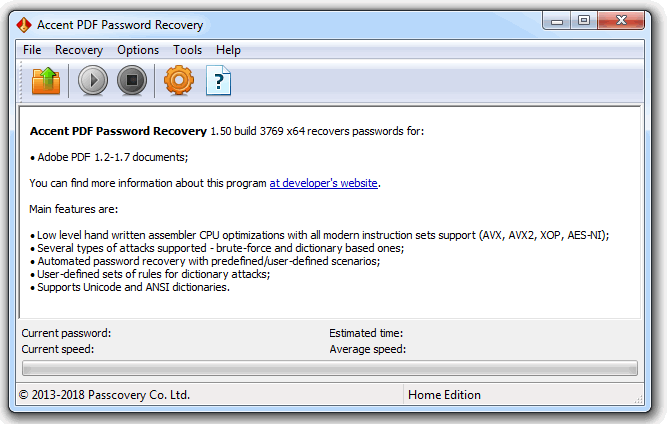
Main window
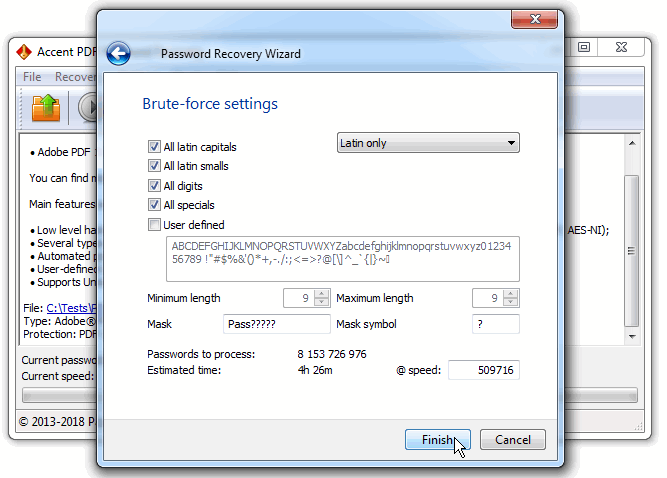
Task Setup
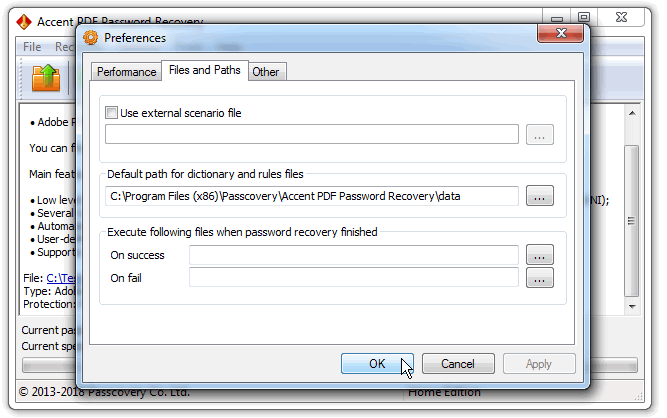
Program settings
Official AccentPPR logo


