

PDF Password Remover for Any Adobe PDF
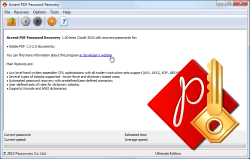
Accent PDF Password Recovery instantly removes the Permissions Password (Owner Password) and delivers high-speed recovery of the Document Open Password (User Password).
Supports all Adobe PDF versions. 100% offline processing keeps your sensitive documents secure with no file uploads and zero risk of data leaks.
AccentPPR is trusted by law firms, healthcare providers, and financial institutions required to meet HIPAA, GDPR, and SOX compliance standards.
Compliance & Security
HIPAA
Compliant
GDPR
Compliant
SOX
Compliant
100%
Offline
The fastest, easiest way to remove PDF passwords
Accent PDF Password Recovery gives you:
- Full support for PDF files created in Acrobat 1.0 - Acrobat DC
- Instant removal of permissions passwords
- Fastest PDF document open password recovery speeds on CPU (speed tests)
- Advanced features that save time during password recovery
- Simple interface, just install and you're good to go
How our PDF password remover works
Here's a video tutorial on everything you can do with Accent PDF Password Recovery and how easy it is:
Why professionals choose offline PDF password recovery
Offline recovery eliminates third-party data transfers. Your file never leaves your computer, never uploads to external servers, never creates leak risks. For lawyers, doctors, and finance professionals, this isn't optional—it's a legal requirement.
Accent PDF Password Recovery runs entirely locally: it processes PDFs on your PC with no internet connection.
What are the risks of online PDF services
Three main risks of online PDF processing:
- Data transfer—your document travels across the internet to someone else's server
- Loss of control—you don't know what happens to your file after upload
- Compliance violations—no logs, no verification, no audit trail
According to IBM, 30% of data breaches involve third parties. Average cost of a breach in 2024: $4.88M. Source: IBM Cost of a Data Breach Report 2024. And it's not just reputational damage—there are significant fines and potential personal liability.
Can you tell an auditor that client data never left your network? With an online tool, the answer is always "no."
| Risk Factor | Online Tools (iLovePDF, Smallpdf) |
Offline Solution AccentPPR |
|---|---|---|
| File upload required | ⚠️ Yes (to their servers) | ✅ No |
| Data leak risk | 🔴 Present | 🟢 Zero |
| Internet connection required | ⚠️ Always | ✅ No |
| HIPAA compliant | ❌ No | ✅ Yes |
| GDPR compliant | ⚠️ Varies | ✅ Yes |
| File size limit | ⚠️ 50-100 MB | ✅ None |
| Audit trail | ❌ No | ✅ Local logs |
⚠️ Pro tip:
Before uploading any document to an online service, check your company policy—it may prohibit third-party file transfers, even for "temporary" processing. AccentPPR eliminates this concern: files stay on your PC.
Which industries require offline-only PDF processing
Offline processing is mandatory in three industries: legal, healthcare, and finance. In each, third-party data transfers either violate the law or destroy client trust.
Law firms
Why it matters: Attorney-client privilege allows no exceptions. Uploading a document to an online service potentially exposes its contents to a third party.
Solution: AccentPPR processes files locally. You can document this for your clients.
Healthcare organizations
Why it matters: HIPAA requires a signed BAA (Business Associate Agreement) with every service that handles patient data. Most online PDF converters don't offer one.
Solution: AccentPPR requires no BAA. No data transfer means no agreement needed.
Financial institutions
Why it matters: SOX requires documenting all operations involving confidential data. Online processing creates undocumented transfers.
Solution: AccentPPR leaves a local audit trail. Auditors can verify: data never left the perimeter.
Looking to remove PDF protection?
Download Accent PDF Password Recovery Free
Windows 11/10/8/7 • Runs locally • No file uploads • Multi-language interface
Supported Formats and Password Types
| Adobe PDF | |||
|---|---|---|---|
| Versions: | Acrobat 2-4 (RC4 40-bit) | Acrobat 5-8 (RC4 128-bit, AES-128) | Acrobat 9-DC (AES-256) |
| Document open password: | C | C | C |
| Encryption key searching: | C | • | • |
| Permissions password: | •* | •* | •* |
| •*- instant recovery C - CPU recovery • - not supported | |||
Adobe PDF files use two types of password protection. The password removal methods for each type of protection are different:
- Permissions password (Master password). Accent PDF Password Recovery instantly removes permissions passwords by creating a decrypted (password-free) copy of the original file.
- Document open password (User password). The document open password cannot be removed – it has to be recovered, or found. AccentPPR leverages all of the power of your PC and guarantees top speed password recovery.
Automatic password search
A special feature for beginners. The program evaluates the computer’s configuration and performance to automatically select the script that best balances search time and the number of passwords to try.
Diverse attacks
Accent PDF Password Recovery offers three methods for password recovery: brute force, attack by mask, and attack by dictionary. Each attack has plusses and minuses. Depending on the situation these types of attacks will have different success rates.
Advanced masking for brute force attacks
A special feature for professionals. The advanced mask support built into the program adds new features for creating sophisticated masks that can verify passwords and save time by omitting unneeded potential password candidates.
Macro language
A special feature for professionals. The built-in macro language describes the rules for mutating the passwords tried in dictionary-based attacks. This changes the shape and appearance of passwords, adding words and characters, combining passwords from several dictionaries, etc. Unusual passwords such as "pa55word" and "VeryStrongPassword1234" are found much more quickly.
How to recover encryption key for Adobe PDF 1.1 - 1.3 (Acrobat 2-4)
Accent PDF Password Recovery removes document open passwords from Adobe PDF files created in Adobe Acrobat 2-4 (with 40-bit encryption). The software simply decrypts the password-protected file and creates an exact copy, only without a password. With this option, you know in advance how long it will take to recover the encryption key – recovery does not depend on the complexity or length of the original password.
Licensing
The demo version of Accent PDF Password Recovery comes with a number of restrictions:
- displays only two first symbols in the password
- attacks cannot be run longer than for 30 minutes
- not saves a Password Recovery Status file
To gain unrestricted access to all of the features of the program, choose a license based on your needs and usage:
| Home License | Business License | |
|---|---|---|
| Adobe PDF 1.1 - 1.3 (Acrobat 2-4) | CPU | CPU |
| Adobe PDF 1.4 - 1.6 (Acrobat 5-7) | CPU | CPU |
| Adobe PDF 1.7 EL3, EL5, EL8 (Acrobat 9-DC) | CPU | CPU |
| Unrestricted | ✔ | ✔ |
| 1 year of free updates | ✔ | ✔ |
| Free technical support | ✔ | ✔ |
| Personal home use (1 PC) | ✔ | ✘ |
| Corporate use (1 PC) | ✘ | ✔ |
| Buy for 40 $ | Buy for 60 $ |
With an Accent PDF Password Recovery license you get:
- Unrestricted access to all features
- Free updates for one year
- Free technical support
Payment is available via various online and offline methods. The full list of options depends on the region and is available on the order page. All transactions related to license purchases for software are secure and strictly confidential.

Can Adobe Acrobat recover a forgotten PDF password
No. Adobe Acrobat Pro does not recover forgotten PDF passwords. It removes protection only if you already know the password. If the password is lost, Acrobat can't help.
It's a common mistake: users buy a $239/year subscription thinking it will solve their password problem. But they end up with a locked file and software that can't find passwords.
Accent PDF Password Recovery is built for exactly this task: it finds forgotten PDF passwords using three methods:
- Brute force—checking all possible character combinations
- Dictionary attacks—searching through lists of common passwords
- Masks—targeted search using known password fragments
The key difference: Adobe assumes you remember the password. AccentPPR finds it when you've forgotten.
AccentPPR vs Adobe Acrobat: features and pricing
| Feature / Scenario | Adobe Acrobat Pro | AccentPPR |
|---|---|---|
| Remove protection (password known) | ✅ Yes | ❌ No |
| Recover forgotten password | ❌ No | ✅ Yes (core function) |
| 100% offline processing | ✅ Yes | ✅ Yes |
| Cost for 1 year | $239.88 | $40-60 |
| Annual renewal | $239.88/year | $12-18/year |
| Total cost over 5 years | $1,199.40 | $88-132 |
| 5-year savings vs Adobe | – | $1,067-1,111 |
AccentPPR doesn't replace Adobe Acrobat. It fills a gap Acrobat doesn't cover. At 7-11% of Adobe's cost.
💡 Common scenario:
We hear from users who bought Adobe Acrobat Pro to recover a password. They spent $239, but the file stayed locked. Accent PDF Password Recovery solves this: it finds lost passwords. For companies with confidential documents, both tools complement each other: Acrobat for editing, AccentPPR for recovering access.
Which tool to choose: AccentPPR or Adobe Acrobat
Depends on the task. They're not competitors—they're tools for different situations.
When you need Adobe Acrobat:
- Creating and editing PDFs
- Removing protection when you know the password
- Everyday document work
When you need AccentPPR:
- Password forgotten or lost
- Inherited files with no documentation
- Archived documents with unknown protection
Who only needs AccentPPR:
- Paralegals—handling client documents
- Healthcare administrators—accessing archived records
- Financial analysts—processing inherited reports
If you rarely edit PDFs but regularly deal with password-protected files, Accent PDF Password Recovery covers you for $88-132 over 5 years. Without paying for editing features you don't need.
Accent PDF Password Recovery features
All of the features you can find in AccentPPR, 25.04  :
:
- Supports Adobe PDF files created in all versions (Adobe Acrobat 2 - Acrobat DC)
- Supports all types of password protection:
- Removes the Open password ("user password") for PDFs
- Removes the Permission password ("master password") for PDFs
- Decrypts documents with 40-bit encryption (Adobe Acrobat 2–4)
- Three attack types: brute force, attack by mask, attack by dictionary
- Automatic password removal mode operates based on preset scripts
- Advanced masking can generate passwords during brute force attacks
- Built-in macro language for creating password mutation rules to be applied during dictionary attacks
- Built-in Rule Editor for easy visual editing of mutation rules
- Convenient, easy-to-learn interface
- Both GUI and command-line interfaces (CLI) included
- Great SecurityApplication with $40 USD for Home License
- Compatible with Windows 11 and earlier versions, all the way back to Windows 7

User Ratings
Be the first! Send us your review of Accent PDF Password Recovery and we will post it here:
Passcovery Suite
Looking for more? You need Passcovery Suite – a multi-format premium GPU password recovery tool.
Passcovery Suite supports:
- Microsoft Office documents
- OpenOffice/LibreOffice documents
- Adobe PDF documents
- Zip and RAR archives
- Apple iOS and Blackberry OS backups
- encrypted TrueCrypt volumes
- WPA/WPA2 handshakes
The software works on NVIDIA/AMD/Intel Arc video cards and guarantees the highest possible password recovery speed on any computer.
Get more about Passcovery Suite
NB: Passcovery Suite uses a PDF password recovery module and an interface that are identical to those used in AccentPPR.
Common questions about privacy
Yes. Accent PDF Password Recovery runs entirely offline and doesn't transmit data over the internet.
The software processes files only on your computer. No connection to external servers, no data shared with third parties.
This architecture meets the requirements of:
- HIPAA - healthcare data protection
- GDPR - European privacy requirements
- SOX - financial reporting
No data transfer audit needed - there's simply no transfer. You stay in control.
Adobe Acrobat doesn't recover forgotten passwords. It removes protection only if you already know the password.
AccentPPR works differently - it finds lost passwords using:
- Brute force - checking all possible combinations
- Dictionaries - searching through lists of common words, passwords, etc.
- Masks - targeted search using known password fragments
The key difference: Adobe assumes you remember the password. AccentPPR finds it when you've forgotten.
Yes. Accent PDF Password Recovery processes files only on your computer - no internet, no external servers.
Documents never leave your PC. This matters for:
- Lawyers - NDA contracts, court materials
- Healthcare professionals - medical records, test results
- Finance professionals - reports, audit documents
Online services upload files to third-party servers - that's a leak risk. AccentPPR works offline, you stay in control.
Quick Info
Version 25.04 April 28, 2025
- The new version features optimized internal processes and improved overall stability for even more efficient password recovery.
Size: x64 – 8400 Kb
Platform:  Windows 11/10/8/7
Screenshots
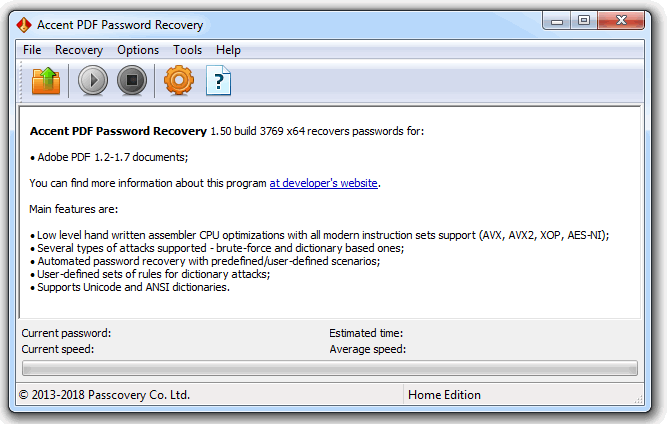
Main window
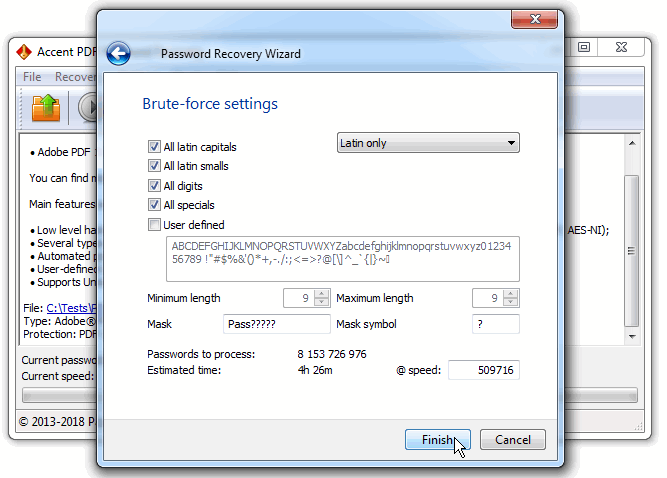
Task Setup
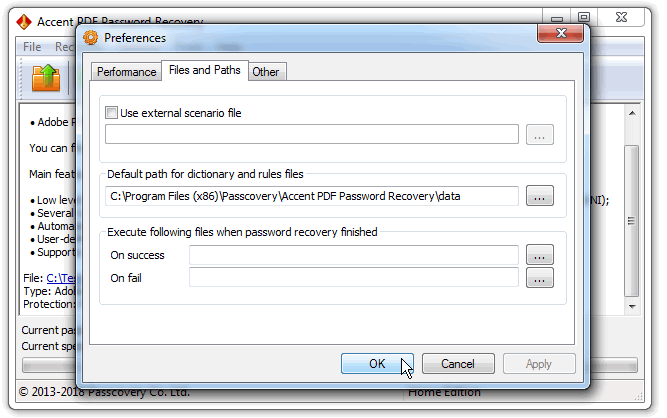
Program settings
Official AccentPPR logo


